// PRJ-001
KESI 工具箱:打開瀏覽器,就能完成日常檔案工作KESI Tools: everyday file jobs, done in your browser
KESI 工具箱的專案介紹:近 40 種在瀏覽器中處理檔案的工具,說明開發動機、可以做什麼、隱私上的做法、使用到的開源元件與目前的限制。About the KESI Tools project: nearly 40 tools that process files inside your browser. Why we built it, what it does, how it handles privacy, which open-source parts it uses and where its limits are.
● 已上線Online 最後更新Last updated 2026-10-12
這個專案要解決的問題:想轉一張圖、合併兩份 PDF,卻要安裝軟體、註冊帳號,或把檔案傳到不知道誰管理的伺服器。The problem it addresses: You just want to convert an image or merge two PDFs, but you are asked to install software, sign up, or upload files to a server you know nothing about.
專案是什麼
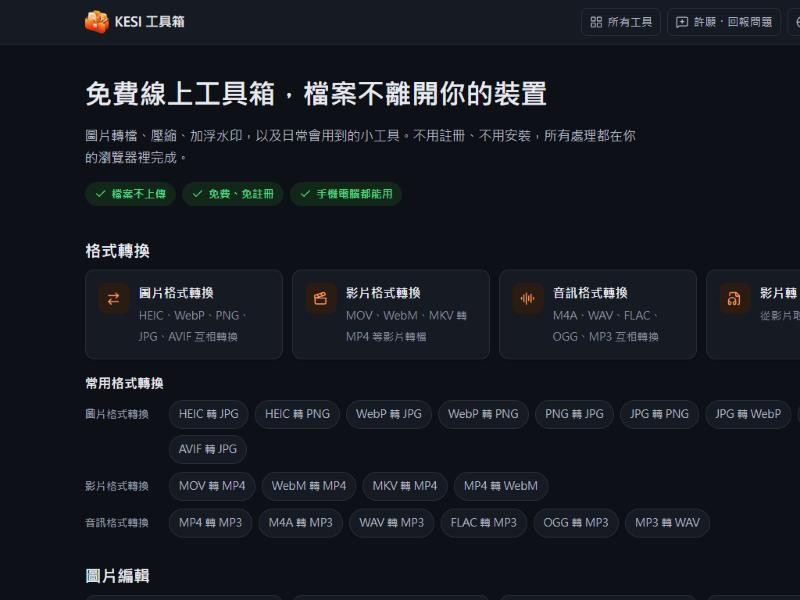
KESI 工具箱是一個網頁工具集合,把平常最常遇到的檔案小任務放在同一個地方:圖片轉檔、壓縮、縮放與裁切,PDF 合併、分割與簽名,影片與音訊轉檔,以及文字比對、QR Code、單位換算等小工具。目前共有近 40 種工具,介面提供繁體中文、簡體中文、英文、西班牙文、葡萄牙文、法文、印尼文與日文。
它的核心做法是:檔案在你自己的瀏覽器裡處理,不會被送到我們的伺服器。網站本身是靜態網站,沒有帳號系統,也沒有可以存放你檔案的後端。
畫面預覽
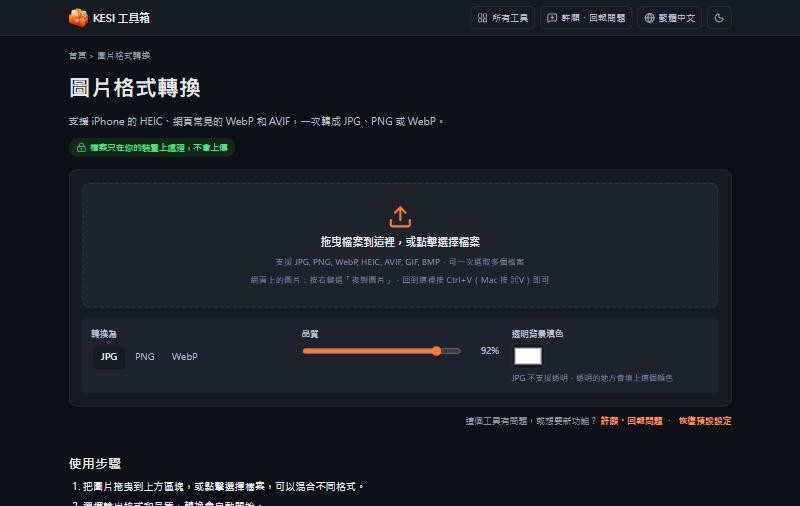
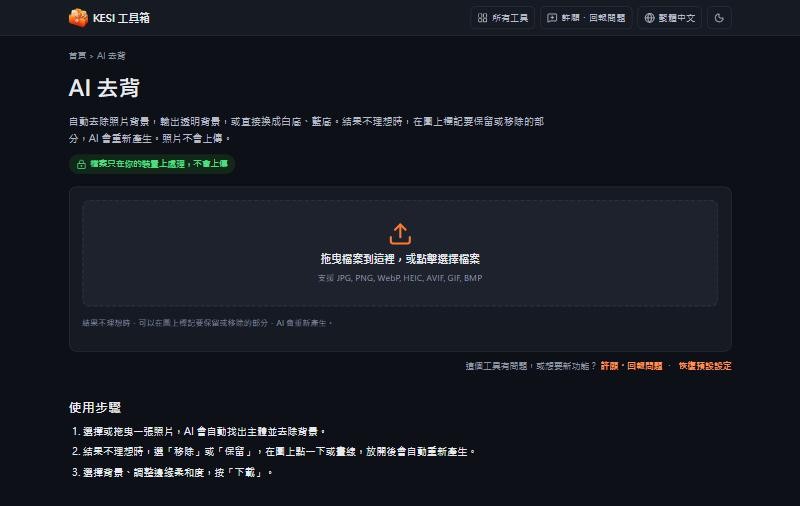
以下為 2026-10-12 擷取的實際畫面,產品更新後可能略有不同。
為什麼做這個
- 手機拍的 HEIC 照片傳到電腦打不開,只是要轉成 JPG,卻找到一堆要上傳檔案、還要等排隊或註冊的網站。
- 報名表要求把照片壓到某個大小以下,簽一份 PDF 要特地裝一套軟體。
- 同樣的小任務,在不同網站上需要反覆確認「這個網站會不會留下我的檔案」。我們希望答案可以是「不會,而且你可以自己驗證」。
可以做什麼
- 圖片:HEIC、WebP、PNG、JPG、AVIF 互轉;壓縮、縮放、裁切、補成正方形;AI 去背;加浮水印或證件用途註記;移除照片中的拍攝位置等 EXIF 資訊;多張截圖拼接;產生 ICO 圖示。
- PDF:合併、分割、重新排序與刪除頁面、圖片轉 PDF(含文件拉正)、PDF 轉圖片、手寫簽名。
- 影片與音訊:常見格式轉換、壓縮、剪輯、影片轉 GIF、擷取 MP3、音訊剪輯與合併。
- 文字與計算:繁簡轉換、字數統計、全形半形轉換、文字比對、QR Code、密碼產生器、檔案雜湊、民國年與農曆、日期與單位換算、時區換算。
- 抽籤與遊戲:抽籤轉盤、線上骰子、爬格子、彩球機。
怎麼使用
以「HEIC 轉 JPG」為例:
- 打開 KESI 工具箱,進入「圖片格式轉換」。
- 把手機匯出的 HEIC 檔案拖進頁面,或直接按一下選擇檔案。
- 選擇輸出格式與品質,預覽結果。
- 下載轉好的圖片,並在自己的相簿或軟體中開啟,確認顏色與方向正常。
如果你把檔案放進不對的工具,網站會提示更適合的工具,不需要自己重新找。
設計上的取捨
- 在瀏覽器處理檔案:好處是檔案不離開你的裝置;代價是處理速度與可處理的檔案大小,會受你的裝置與瀏覽器影響。
- AI 去背使用自行託管的模型:模型檔案放在我們自己的網站,由你的瀏覽器下載後在本機執行,圖片不會送到第三方的 AI 服務。模型會定期檢查是否有新版本。
- 「記住上次內容」預設關閉:常用的選項可以記住,但檔案與文字內容只有在你明確開啟時才會保存在這台裝置上,PDF 簽名還會多一道警告。頁尾可以一鍵清除。
- 可以離線使用:網站可以安裝成應用程式,開過的頁面與工具在沒有網路時也能使用。
技術與資料來源
網站以 Astro 與 React 建置為靜態網站,部署在 Cloudflare Pages。各項處理使用瀏覽器內建能力,並搭配開源元件,例如 HEIC 解碼(heic-to)、影音處理(Mediabunny,WebAssembly)、AI 去背(MediaPipe)與繁簡轉換(OpenCC)。完整的元件、授權與公開資料來源(例如台灣國定假日資料)列在 KESI 的授權頁。
「檔案不上傳」不等於「連線完全沒有」:網站載入時仍會有網站本身的檔案、Google Analytics 與廣告的請求,農曆工具也會把查詢的日期傳到香港天文台核對。KESI 有一頁說明如何用瀏覽器開發者工具或斷網測試,自己確認檔案沒有被上傳。
限制與注意事項
- 不同瀏覽器支援的格式與編碼不同,部分影音轉換在較舊的瀏覽器或手機上可能無法使用。
- 很大的檔案(例如長影片)會佔用大量記憶體,處理時間也比專業軟體長。
- 轉檔與壓縮都可能讓畫質有所變化,重要的原始檔請自行保留備份。
- AI 去背的結果會因圖片而異,邊緣細節複雜時可能需要手動標記修正。
- PDF 簽名只是把簽名圖放進文件,不具備數位簽章的法律效力認證功能;是否適用,請依你要提交的單位規定。
前往與回饋
你可以直接前往 KESI 工具箱,或閱讀其中的 如何確認檔案沒有上傳。想要的功能或遇到問題,歡迎使用站內的「許願/回報」,或寫信到 [email protected]。
What it is
KESI Tools is a collection of web tools for the small file jobs people run into most often: converting, compressing, resizing and cropping images; merging, splitting and signing PDFs; converting video and audio; plus text diff, QR codes, unit conversion and similar helpers. There are nearly 40 tools today, and the interface is available in Traditional Chinese, Simplified Chinese, English, Spanish, Portuguese, French, Indonesian and Japanese.
The core idea is that your files are processed inside your own browser and are not sent to our servers. The site is static: there are no accounts and no backend that could store your files.
Screenshots
Screenshots taken on 2026-10-12. The product may look slightly different after updates.
Why we built it
- A HEIC photo from a phone will not open on a computer. All you need is a JPG, yet most sites ask you to upload the file, wait in a queue, or sign up.
- A form wants a photo under a certain size, or a PDF needs a signature, and you end up installing a whole application.
- For every small task you have to re-check whether a site keeps your file. We want the answer to be "no, and you can verify it yourself".
What you can do with it
- Images: convert between HEIC, WebP, PNG, JPG and AVIF; compress, resize, crop and pad to a square; AI background removal; add watermarks or ID-use notes; remove EXIF data such as shooting location; stitch screenshots; make ICO icons.
- PDF: merge, split, reorder and delete pages; images to PDF (with document straightening); PDF to images; handwritten signatures.
- Video and audio: common format conversion, compression, trimming, video to GIF, extracting MP3, cutting and merging audio.
- Text and calculators: Chinese conversion, word count, full-width/half-width conversion, text diff, QR codes, password generator, file hashes, ROC year and lunar calendar, date and unit conversion, time zones.
- Draws and games: a spin wheel, online dice, ghost leg and a garagara lottery machine.
How to use it
Taking "HEIC to JPG" as an example:
- Open KESI Tools and go to the image converter.
- Drag the HEIC file exported from your phone onto the page, or click to choose a file.
- Pick the output format and quality and check the preview.
- Download the converted image and open it in your own gallery or software to confirm the colours and orientation.
If you drop a file into the wrong tool, the site suggests a better one so you do not have to search again.
Design decisions
- Processing in the browser: your files stay on your device. The cost is that speed and the file sizes you can handle depend on your device and browser.
- A self-hosted AI model for background removal: the model file lives on our own site, your browser downloads it and runs it locally, and images are not sent to a third-party AI service. The model is checked for new versions regularly.
- "Remember last content" is off by default: frequently used options can be remembered, but file and text content are saved on your device only if you turn that on, with an extra warning for PDF signatures. One click in the footer clears everything.
- Works offline: the site can be installed as an app, and pages and tools you have opened keep working without a connection.
Technology and data sources
The site is built with Astro and React as a static site hosted on Cloudflare Pages. Processing uses built-in browser capabilities together with open-source components, for example HEIC decoding (heic-to), media processing (Mediabunny, WebAssembly), AI background removal (MediaPipe) and Chinese conversion (OpenCC). The full list of components, licences and public data sources (such as Taiwan's public-holiday data) is on KESI's licences page.
"Files are not uploaded" does not mean "no network traffic at all": the site's own files, Google Analytics and ad requests still happen, and the lunar calendar tool sends the date you look up to the Hong Kong Observatory for cross-checking. KESI has a page that shows how to confirm with browser developer tools or an offline test that your files are not uploaded.
Limitations
- Browsers support different formats and codecs, so some video and audio conversions may not work on older browsers or phones.
- Very large files, such as long videos, use a lot of memory and take longer than professional software.
- Conversion and compression can change image quality. Keep your original files as a backup.
- AI background removal varies by image, and complex edges may need manual marking.
- A PDF signature only places a signature image in the document and is not a certified digital signature. Check the requirements of whoever you are submitting to.
Go further and give feedback
Go straight to KESI Tools, or read how to verify that files are not uploaded. For feature requests or problems, use the wish/report button on the site or email [email protected].
其他專案
- GearLab 遊戲周邊實驗室:買了高刷新率螢幕或高回報率滑鼠,卻不知道它在自己的電腦上是否真的以規格運作。
- OmniRadar 山海路全方位雷達:出門前要在公路局、氣象署、地圖與潮汐網站之間來回切換,才能拼出一個決定。
- AfterHero 保固通:發票與保固卡散落在抽屜與信箱,東西壞了才發現過保,也找不到型號與客服電話。
Other projects
- GearLab: You bought a high-refresh monitor or a high-polling-rate mouse, but have no easy way to tell whether it really runs to spec on your own PC.
- OmniRadar: Before a trip you have to jump between the highway bureau, the weather agency, maps and tide sites to piece one decision together.
- AfterHero: Receipts and warranty cards are scattered across drawers and inboxes, and you only find out a warranty has expired when something breaks.